

To tailor your resume to a job description, find the requirements the employer lists, match each one to a true line on your resume, then reorder and reword your summary, bullets and skills so that proof is easy to see. You change emphasis and wording, never the facts. The steps and example below show how.
What does it mean to tailor a resume to a job description?
Resume tailoring is shaping one resume for one posting by choosing, ordering and wording your real experience around what that employer asked for. It doesn't mean rewriting your history or adding skills you lack.
Think of it as editing, not writing. Your experience stays the same. What changes is which parts you lead with, which terms you use, and what you leave out to make room.
Tailoring is different from a full rewrite. A rewrite fixes a weak resume. Tailoring takes a resume that's already solid and points it at one job.
Why should you tailor your resume?
Because readers skim, and software searches. A tailored resume puts the proof a reader is looking for where they'll see it, in words they'll recognize.
The skim is short. In 2018, HR Dive reported that an eye-tracking study by Ladders found recruiters skim a resume for an average of 7.4 seconds on the initial screen, up from about six seconds in 2012. That's often called the "7 second rule".
The same report found that simple layouts with clear sections, bold titles and bulleted accomplishments held attention. Cluttered layouts, multiple columns and long sentences did not. So tailoring is partly about content and partly about putting the right content first.
Applicant tracking systems add a second reason. Many let recruiters search applications for skills and terms. If you did the work but called it something else, a search may not surface you.
How do you tailor your resume to a job description, step by step?
Work through seven steps, from your master resume to a final check. The order matters, because each step uses what the one before it found.
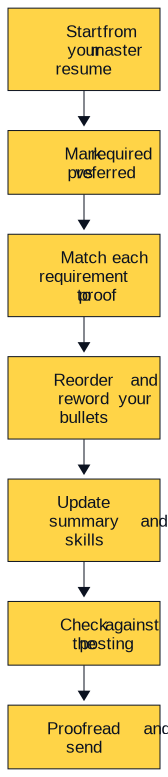
Step 1: Start from a master resume
A master resume is a private document with every job, project, tool and result you have, at any length. Each tailored resume starts as a copy of it. Master resume vs tailored resume compares the two side by side.
This saves you from rewriting from scratch. It also means a bullet you cut for one job is still there for the next one. West Virginia University's career center recommends keeping a master resume up to date for exactly this reason.
Step 2: Read the posting and rank the requirements
Read the whole posting once, then sort what it asks for into required, preferred and nice to know. Not everything in a posting carries the same weight.
WVU's guide suggests a simple rule. Read the qualifications as requirements, the responsibilities as a bonus, and the company overview as extra context and cover letter material.
Save a copy of the posting too, since it may be taken down before your interview. Duke's Career Hub suggests saving it as a PDF rather than just bookmarking it.
To pull out the terms that matter, look for:
- Skills and tools named more than once
- Words in the job title and the first lines of the posting
- Anything marked "required", "must" or a minimum number of years
- Certifications, licenses or degrees
The free ATS keyword checker can pull the posting's main terms out for you, which is a useful second pass after your own read. For a full walkthrough, see how to find keywords in a job description.
If a posting is vague, look up the occupation on O*NET OnLine, which is sponsored by the U.S. Department of Labor and lists the tasks typical of each occupation. It helps you guess what an unclear posting means.
Step 3: Match each requirement to proof on your resume
For every requirement, find one line on your resume that shows you've done it. Write the requirement and the line side by side.
You'll end up with three groups. Some requirements already have clear proof. Some have proof that's buried or worded differently. Some have none.
The second group is where tailoring pays off. The third group is where honesty matters. If you've done it and left it off, add it in your own words. If you haven't, leave it.
If most requirements land in the third group, tailoring won't close the gap. It may be worth seeing which jobs your resume already fits instead, or finding jobs that match your skills by searching on what you can do rather than your title.
Step 4: Reorder and reword your bullets
Move the bullets that prove the top requirements to the top of each job. Then reword them so the evidence is obvious, using the employer's term for something you really did.
Lead each bullet with the skill or result the employer cares about. "Kept a spreadsheet of complaints" says less to a reader than "Tracked the most common customer complaints", even though it's the same work. For formulas and examples, see how to write resume bullet points. If your work doesn't come with obvious numbers, quantifying your resume without numbers shows how to show scope and frequency instead.
Use the employer's vocabulary only for real things. If they say "ticketing system" and you used Zendesk, name Zendesk. If they say "onboarding" and you never onboarded anyone, don't borrow the word.
Step 5: Update your summary and skills section
Rewrite your summary in two or three sentences so it names the role you're applying for and the strongest proof you found in step 3. Then reorder your skills list so the posting's must-haves come first.
The summary is the first thing a skimming reader sees, so it should carry your best match. Use only facts that appear elsewhere on your resume. For models by career stage, see these resume summary examples.
In the skills section, list a tool or skill only if a bullet or project backs it up. A long list of unproven keywords reads as padding to a person, even if software counts it.
Step 6: Check the result against the posting
Go back to your list from step 2 and check each requirement against the new version. For each one, ask whether a reader would find the proof in a few seconds.
Check requirements, not just words. "3+ years leading a support team" isn't met by the word "support" appearing somewhere on the page. It's met by a line that shows you led a team for that long.
Step 7: Proofread and save the version
Read the resume once more for the previous employer's name, a summary meant for another role, and broken formatting. Then save it with the company and role in the file name. If you're unsure your layout will read cleanly, the guide to an ATS-friendly resume covers format, fonts and file type.
Keep each tailored version. When an interview comes, you'll know exactly what that employer read.
Your list of requirements and proof also gives you the outline for your letter. See how to tailor a cover letter to a job for the steps and a full before/after example.
What should you change, and what should you never change?
Change order, emphasis and wording. Never change facts such as titles, employers, dates, degrees, numbers or results.
This is the line between tailoring and making things up. Here is a table you can keep next to you while you edit.
| Part of your resume | You can change | Keep exactly as it is |
|---|---|---|
| Summary | Which role you name, which strengths you lead with | Your years of experience |
| Job entries | Order of bullets, wording, which bullets you include | Job title, employer, location, dates |
| Bullets | Verbs, terms, which detail comes first | Every number, tool and outcome |
| Skills | Order, grouping, which proven skills you list | No skill you can't back up |
| Section headings | Names, such as "Research Experience" for a research role | The facts inside the section |
| Education | Order on the page, relevant courses or projects you list | Degree, school, dates, GPA |
| Certifications | Whether they're near the top | Name, issuer, dates |
Duke's Career Hub gives the heading example in that table. Renaming "Work Experience" to "Research Experience" for a research posting is fine, because what's inside stays true.
What does a tailored resume look like? A worked example
Here's one posting, one resume and every change, from start to finish. Each "after" line uses only facts already in the "before" line.
The posting
This job description is an illustration, written for this example. It isn't a real posting.
Customer Success Associate, B2B software company, remote (US)
Requirements: 1+ years in a customer-facing role. Experience with a ticketing system such as Zendesk. Write and update help center articles. Track customer issues and report trends to the team. Onboard new customers onto the product.
Preferred: Basic SQL.
Ranked, the five skill requirements are: a ticketing system, help articles, trend reporting, customer onboarding and SQL. The years of experience and remote location are scored separately.
The resume before tailoring
The candidate is a customer support specialist with two years at an online furniture store. Their resume was written for retail support jobs.
Summary: Customer support specialist with 2 years of experience helping customers of an online furniture store.
- Showed 3 new hires how our returns process worked.
- Answered customer emails and calls in Zendesk.
- Kept a spreadsheet of the complaints we got most often and sent it to my manager every Friday.
- Wrote 12 FAQ pages about returns and delivery.
The resume after tailoring
Summary: Customer support specialist with 2 years answering customer emails and calls in Zendesk, writing help articles and tracking the most common customer issues for an online furniture store.
- Resolved customer emails and calls in Zendesk for an online furniture store.
- Wrote 12 help articles on returns and delivery for the store's FAQ.
- Tracked the most common customer complaints in a spreadsheet and reported them to my manager weekly.
- Trained 3 new hires on the returns process.
What changed, and why
| Requirement | Before | After |
|---|---|---|
| Ticketing system | Proof in the second bullet | Proof first, and in the summary |
| Help center articles | "FAQ pages", easy to miss | "Help articles", the employer's term |
| Trend reporting | A spreadsheet "sent to my manager" | "Tracked" and "reported", now clear |
| Customer onboarding | Not shown | Still not shown, because the candidate hasn't done it |
| Basic SQL | Not shown | Still not shown |
Notice what didn't happen. The "after" version doesn't claim onboarding customers, because training new hires isn't the same thing. It doesn't add SQL. The 12 articles, the 3 new hires and the 2 years are unchanged.
How the match changes
This score is an illustration, calculated by hand with the weights on Rolefitly's How matching works page. It isn't from running the product.
Rolefitly's score is a weighted total of four parts. Skills count for 50%, location for 20%, experience for 15% and job title for 15%.
| Part | Weight | Before | After |
|---|---|---|---|
| Skills (share of skill requirements proven) | 50% | 2 of 5 = 40 | 3 of 5 = 60 |
| Location (remote, and the candidate wants remote) | 20% | 100 | 100 |
| Experience (2 years against 1+) | 15% | 100 | 100 |
| Job title (support specialist against success associate, a close equivalent) | 15% | 80 | 80 |
| Score out of 100 | 67 | 77 |
In this illustration, "FAQ pages" and the complaint spreadsheet count as unclear before tailoring, so only Zendesk and the articles count as proven. After, trend reporting is clear too. The title part stays the same, because the job title didn't change, and it shouldn't.
Both scores fall in the "good fit" band. Tailoring made the real fit visible. It didn't make the candidate fit more than they do, and a score only estimates fit. It doesn't predict an interview. For what counts as a good score and why tools disagree, see resume match scores explained.
If you're tailoring well and still hearing nothing back, the cause may be which jobs you pick or how you apply. Why am I not getting interviews? helps you find which stage is failing.
What are the most common resume tailoring mistakes?
Most mistakes come from treating tailoring as keyword stuffing, or from going too far. These are the ones recruiters treat as red flags, with a fix for each.
- Pasting sentences from the posting. It describes the job, not you. Fix: use the employer's term inside your own bullet about your own work.
- Hiding keywords in white text. It appears when the file is converted to plain text or highlighted. Fix: put true keywords in visible bullets or your skills list.
- Adding a skill you don't have. It comes apart in the interview. Fix: leave the gap, and mention a plan to close it in your cover letter if it matters.
- Changing a job title to match. Past employers can confirm your real title. Fix: keep the real title, and let the bullets show the overlap.
- Only editing the skills section. A skills list without proof convinces nobody. Fix: make sure every listed skill appears in a bullet or project.
- Leaving the best match at the bottom. A short skim never reaches it. Fix: move it to the top of its job, and into your summary.
- Sending the last company's version. A leftover employer name or summary is an easy reason to stop reading. Fix: proofread for names, and name each file by company and role.
- Cutting everything the posting doesn't mention. You may delete proof of a transferable skill. Fix: cut what's irrelevant, but keep what shows a skill the role needs in other words.
Can you use AI to tailor your resume?
Yes, if you treat its output as a draft and check every line against what you really did. AI tools are good at rewording and bad at knowing which facts are true.
The main risk is invented detail. A tool can add a metric, a tool name or a responsibility that sounds right and isn't yours. For prompts that rule this out and a line-by-line check, see how to use AI to tailor your resume.
Rolefitly's tailoring is built around that risk. It selects, reorders and rephrases your own content, shows you each change with the before and after, and lets you accept or reject it. New facts are added only if you confirm they're true. The free plan includes 2 tailored applications.
Is tailoring a CV the same as tailoring a resume?
Yes. The method is the same, whichever word you use. What differs is what "CV" means where you're applying.
- In the US and Canada, a CV (curriculum vitae) usually means a longer document for academic, research and medical roles. Most other jobs ask for a resume of one or two pages.
- In the UK, Ireland and much of Europe, "CV" is the everyday word for what Americans call a resume.
To tailor a CV to a job description, follow the seven steps above. Two things are worth adjusting:
- The personal statement. A UK-style CV often opens with a few lines about you. Use them the way you'd use a resume summary: name the role and the two or three requirements the posting stresses most, with proof.
- Section order on an academic CV. You don't cut an academic CV down the way you would a resume. Instead, move the sections the posting cares about most, such as teaching, research or grants, nearer the top.
The rule doesn't change either: reorder and reword what's true, and never add what isn't.
Your tailoring checklist
Copy this list and run through it for each application.
- Started from a copy of my master resume
- Saved the posting as a PDF
- Marked each requirement as required or preferred
- Found one resume line that proves each requirement I meet
- Moved the strongest proof to the top of each job
- Used the employer's terms only for things I really did
- Rewrote my summary to name this role and my best match
- Reordered my skills, listing only skills a bullet backs up
- Kept every title, employer, date, degree and number unchanged
- Checked each requirement against the new version
- Removed the previous employer's name and any old summary
- Saved the file with the company and role in its name
The searches this answers include "how to tailor resume to job description", "how to tailor cv to job description", "update resume based on job description", "edit resume based on job description", and "optimize resume for job description".