

A resume match score estimates how much of one job posting your resume shows, usually as a percentage or a score out of 100. Most tools suggest aiming for 75 to 80 percent. No score gets you an interview, though. Employers set their own criteria and people make the decision, so treat the score as a checklist, not a prediction.
What is a resume match score?
A resume match score is a number that compares your resume with one job description and estimates how much of what the employer asked for your resume shows. It's calculated for one job at a time.
You'll see it under different names. Jobscan calls it a match rate. Other tools say fit score, ATS score or resume score. Some employers' systems, such as Greenhouse, calculate their own match score that only the recruiter sees.
The number is only as good as what it measures. Two tools can read the same resume and the same posting and give you 62 and 81, and both can be working as designed.
What does a match score actually measure?
It depends on the tool, and that's the most important thing to know about any score. There are three broad kinds.
- Keyword overlap. The tool pulls skills and terms from the posting and counts how many appear in your resume. WGU's career services guide notes that this kind of tool looks for exact matches, so "managed projects" may not count for "project management".
- Requirements met. The tool reads each requirement as a whole and checks whether a line on your resume shows it. "3+ years leading a support team" isn't met by the word "support" appearing somewhere.
- Weighted fit. The tool scores several parts separately, such as skills, experience, job title and location, then combines them with fixed weights.
Rolefitly uses the last two. The free resume and job description checker gives the share of the posting's requirements your resume meets. The score on each job in your matches is a weighted total, explained below.
How is a match score calculated?
Most tools pull the requirements out of the posting, look for evidence of each one in your resume, and turn the result into a number out of 100. What differs is what counts as evidence and how much each part weighs.
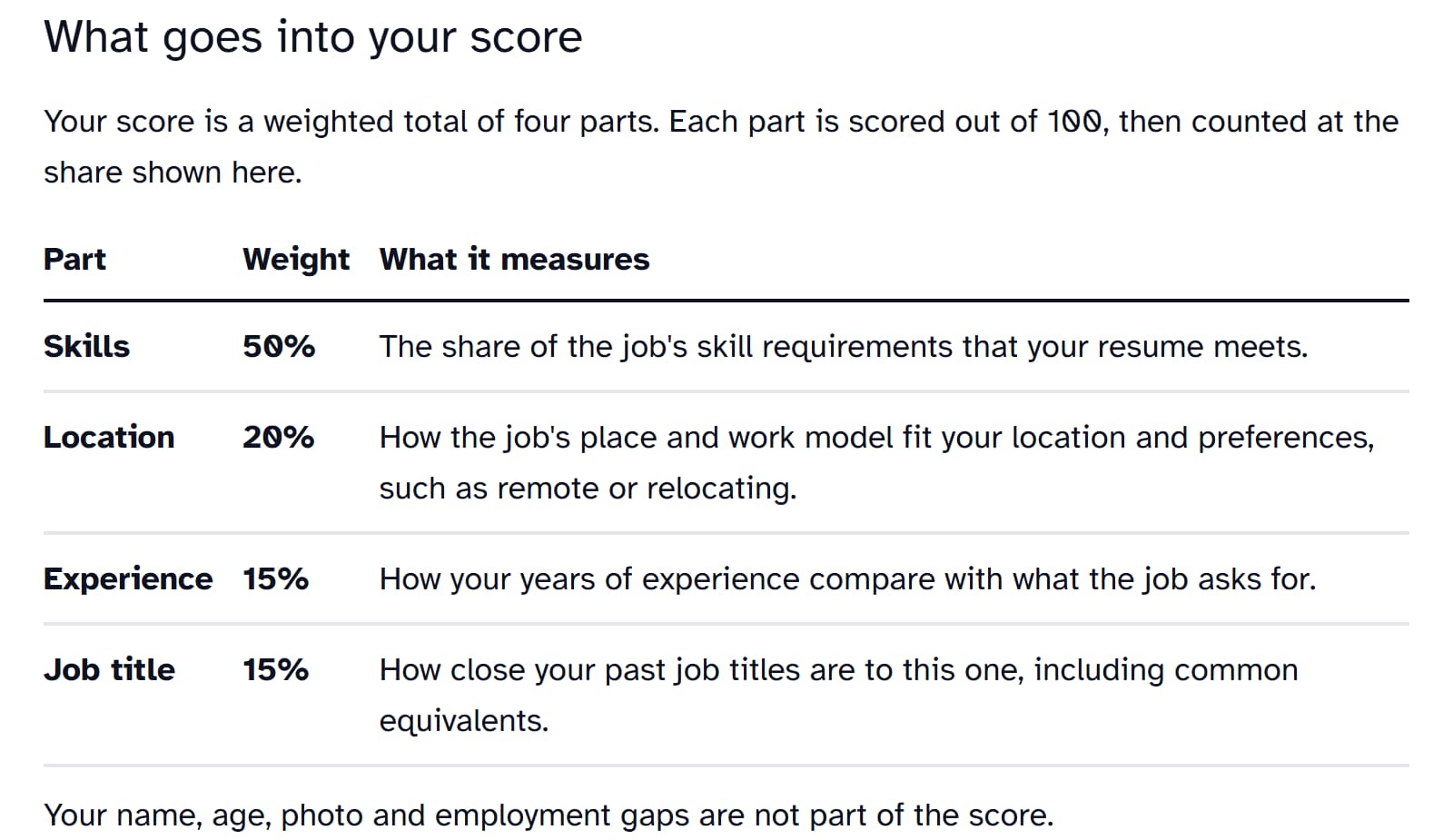
Rolefitly publishes its weights on the How matching works page. Each part is scored out of 100, then counted at its share.
| Part | Weight | What it measures |
|---|---|---|
| Skills | 50% | The share of the job's skill requirements your resume meets |
| Location | 20% | How the job's place and work model fit your location and preferences |
| Experience | 15% | Your years of experience against what the job asks for |
| Job title | 15% | How close your past titles are to this one, including common equivalents |
Your name, age, photo and employment gaps aren't part of the score. Other tools weigh things differently, which is one reason the same resume scores differently from tool to tool.
What percentage do you need to get an interview?
There's no percentage that gets you an interview. A match score measures what's on your resume against what's in the posting, and an interview depends on things no score sees: how many people applied, internal candidates, the recruiter's judgment and the hiring manager's priorities.
What tools and career centers give is a target for a well-matched resume:
- Jobscan "generally recommend[s] a match rate score of 80%", and says many users and career counselors see success with 75%.
- Sonoma State's career center tells students to aim for a 75 to 80 percent match.
- WGU's career services tells students to aim for 75 percent, and adds that you don't have to hit 100.
These are good targets for that tool. They aren't an employer's pass mark, and they don't carry over to other tools.
What do Rolefitly's score bands mean?
Rolefitly groups scores into four bands, so you can see at a glance which jobs are worth a closer look.
| Score | Band | What it means |
|---|---|---|
| 80 to 100 | Strong fit | You meet most of what the job asks for |
| 65 to 79 | Good fit | You meet a good share of what it asks for |
| 50 to 64 | Partial fit | You meet some of it. Check the gaps before you apply |
| Under 50 | Hidden by default | Rarely a realistic fit |
As the How matching works page says, a score estimates how well your resume fits a job. It doesn't predict whether you'll get an interview or an offer.
Do employers use match scores to reject you?
Some employers' systems calculate a match score, but the ones we checked leave the decision to people. A recruiter sets the criteria, looks at the score and decides.
Greenhouse's candidate FAQ says its Talent Matching feature "does not automatically advance or reject candidates" and that recruiters and hiring managers remain responsible for all hiring decisions. Its data processing FAQ adds that recruiters set the criteria, and that the match is sorted into Strong, Good, Partial or Limited.
What can reject you automatically is a screening question the employer sets, such as whether you're authorized to work in the US. Your score has nothing to do with those.
Can rigid matching shut out qualified people?
Yes, and employers know it. In the Harvard Business School and Accenture report Hidden Workers: Untapped Talent, most employers surveyed said qualified people were rejected because they didn't exactly match the criteria in the posting.
Source: HR Dive, reporting the Harvard Business School and Accenture Hidden Workers report
See the data as a table
| Value | |
|---|---|
| High-skilled candidates | 88% |
| Middle-skilled candidates | 94% |
That's the honest reason to care about match. Not because a number gets you through, but because a recruiter searching for a skill can't find you if your resume describes it in other words.
Why do different tools give different scores?
Because they measure different things. One counts keywords, another checks requirements, and another weighs location and experience. Each is internally consistent, so a score only means something next to other scores from the same tool.
- Different inputs. Some read only skills. Others also read job titles, years, education and location.
- Different matching. Exact keyword tools miss synonyms. Requirement-based tools accept the same skill in other words, but won't count a word that doesn't show the requirement.
- Different weights. One tool may count keywords as most of the score, another as a small share.
Pick one tool, use it the same way for every job, and compare scores only within it.
Should you aim for a 100 percent match?
No. A perfect score usually means the resume repeats the posting rather than describing your work. Jobscan itself warns against an "over-optimized" resume, and WGU's guide says a 100 percent match may leave your resume "sounding unnatural or keyword-stuffed".
The recruiter reads the result. A bullet that strings five of the posting's phrases together reads like it, and it costs you more than the extra points gain.
Most postings also list more than the employer strictly needs. Missing one preferred skill is normal for a strong applicant.
Should you apply if your match score is low?
Read the gaps before you decide. A low score with gaps in preferred skills is often worth applying to. A low score because you miss a required license, degree or years of experience usually isn't. If most of your scores come back low, the target may be the problem, and finding jobs that match your skills shows how to search by skill instead of title.
Use the score to sort, then read:
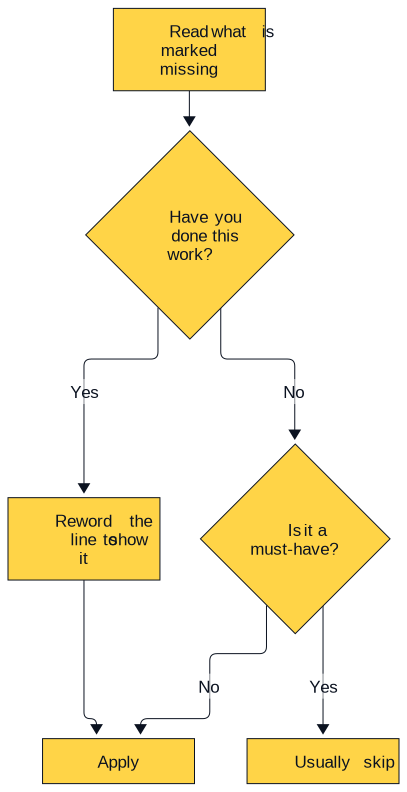
- Look at what's missing. Every tool worth using shows the missing items, not just the number.
- Sort each gap. Is it wording (you did it but the resume doesn't say so), or experience (you haven't done it)?
- Fix wording gaps. Rewrite the line in the posting's words, using only true facts.
- Weigh experience gaps. A missing must-have usually means skip. A missing nice-to-have usually doesn't.
If you're applying widely and hearing nothing, the problem may not be your scores at all. Why am I not getting interviews? helps you find which stage is failing.
How do you improve your resume match score without lying?
Make the experience you already have visible in the posting's words. That's the whole method, and it's what tailoring your resume to a job description means.
- Use the posting's terms for things you've done. If you wrote "GA" and the posting says "Google Analytics", write it out. Indeed's guide to ATS resumes puts it well: use the employer's language "when it truthfully matches your experience".
- Name the tool, not just the task. "Sent the monthly newsletter" hides that you used Mailchimp, if you did.
- Move the most relevant lines up. Put what the posting asks for first, in your summary and in the first bullet of each job.
- Spell out acronyms once. Write both forms, such as "Search Engine Optimization (SEO)".
- Make sure your file parses. A score is only as good as the text a tool pulls out of your file. The ATS-friendly resume guide covers format, and the free ATS-friendly check shows how to test it before you trust a score.
A match score before and after: a worked example
Here's one posting, a resume's bullets before and after, and how the score changes. Every "after" bullet only rephrases a fact already in the "before" bullet.
The posting
This job description is an illustration, written for this example. It isn't a real posting.
Marketing Coordinator, regional credit union, hybrid (Denver, CO)
Requirements: 2+ years in marketing. Plan and send email marketing campaigns in Mailchimp. Create social media content. Write clear copy for print and web. Report on website traffic in Google Analytics. Coordinate community events.
The six skill requirements are email marketing, Mailchimp, social media content, copywriting, Google Analytics and event coordination. Years, location and title are scored separately.
The resume before
The candidate has been a Marketing Assistant at a local bakery chain since March 2024 and lives in Denver.
- Handled the monthly newsletter (Mailchimp) for our customer list
- Posted on Instagram and Facebook 3x a week, writing all the captions
- Checked website numbers in GA each month and sent them to the owner
- Helped out at the in-store tasting days
The resume after
- Managed the monthly customer email newsletter in Mailchimp
- Posted to Instagram and Facebook 3 times a week and wrote all captions
- Reported monthly website traffic to the owner from Google Analytics
- Helped out at in-store tasting days
| Requirement | Before | After |
|---|---|---|
| Email marketing | Unclear ("newsletter", not "email") | Shown ("email newsletter") |
| Mailchimp | Shown | Shown |
| Social media content | Shown | Shown |
| Copywriting | Shown ("writing all the captions") | Shown |
| Google Analytics | Unclear ("GA") | Shown, written out |
| Event coordination | Not shown | Still not shown, because helping out isn't coordinating |
The newsletter was sent through Mailchimp, so calling it an email newsletter adds no new fact. "GA" became "Google Analytics" because that's what it stands for. The tasting days stay as "helped out", because the candidate didn't coordinate them, and the score has to live with that.
How the score changes
This score is an illustration, calculated by hand with the current weights on Rolefitly's How matching works page. It isn't from running the product. The location, experience and title values are assumptions for this example.
| Part | Weight | Before | After |
|---|---|---|---|
| Skills (share of the six requirements shown) | 50% | 3 of 6 = 50 | 5 of 6 = 83 |
| Location (lives in Denver, job is hybrid in Denver) | 20% | 100 | 100 |
| Experience (about 2.7 years against 2+) | 15% | 100 | 100 |
| Job title (marketing assistant against marketing coordinator, close but not equal) | 15% | 70 | 70 |
| Score out of 100 | 71 | 87 |
The before score is 25 + 20 + 15 + 10.5, which rounds to 71. The after score is 41.7 + 20 + 15 + 10.5, which rounds to 87.
The resume moved from "good fit" to "strong fit" without a single new claim. The title part didn't move, and shouldn't, because tailoring never changes a job title you held. Event coordination is still a real gap, and the candidate can speak to it in an interview if asked.
A score only estimates fit. The 87 says the resume now shows what the candidate has done. It doesn't say they'll get the interview.
What to do at each score: a copyable guide
Copy this into your job search notes. The ranges follow Rolefitly's bands. On another tool, use its own bands.
| Your score | What it usually means | What to do |
|---|---|---|
| 80 to 100 | Your resume shows most of what's asked | Check the one or two gaps, fix any wording gaps, and apply |
| 65 to 79 | A good share is shown, some isn't | Sort each gap into wording or experience. Fix wording, then apply if you meet the must-haves |
| 50 to 64 | Some is shown, a lot isn't | Read the must-haves. Apply only if you meet them and can explain the rest |
| Under 50 | Most of what's asked isn't on your resume | Usually skip, unless the posting is unusually broad or the score missed experience you have |
Before every application:
[ ] Read what the score marks as missing, not just the number
[ ] Sort each gap: wording (I did it) or experience (I didn't)
[ ] Rewrite wording gaps in the posting's terms, true facts only
[ ] Check the must-haves: license, degree, years, location
[ ] Re-run the same tool once, then stop editing and apply
When should you stop optimizing your score?
Stop once the score is in your tool's target range and every wording gap is fixed. Past that point, extra points usually come from repeating keywords, not from showing more of your experience.
A good rule is one edit pass and one re-check per job. If the score is still low after that, the gaps are experience, not wording, and more editing won't change that.
Your time is better spent on the next good match, or on a note to someone at the company.
What are the most common match score mistakes?
Most come from treating the number as the goal instead of a list of things to check. Here are the ones to avoid, each with its fix.
- Treating the score as interview odds. An 80 doesn't mean an 80 percent chance. Fix: use the score to sort jobs and spot gaps, nothing more.
- Comparing scores across tools. Each tool measures differently. Fix: pick one tool and compare scores only within it.
- Adding skills you don't have. It raises the number and fails at the first interview question. Fix: add a skill only if you've used it and can talk about it.
- Hiding keywords in white text. Jobscan calls it "risky and unethical" and says some systems can detect it. Fix: put real keywords in real lines.
- Pasting the posting's phrases into every bullet. It reads as keyword stuffing to the recruiter. Fix: use each important term once or twice, where it's true.
- Ignoring the missing list. The number alone doesn't say what to fix. Fix: read every missing item and sort it into wording or experience.
- Skipping good jobs over a few points. A 72 with only preferred skills missing is often a better bet than an 85 for a role you don't want. Fix: read the must-haves before you decide.
- Testing a file that doesn't parse. A scrambled file scores low for the wrong reasons. Fix: check that your resume's text copies out cleanly before you trust any score.
Where can you check your resume match score for free?
Rolefitly has two free ways. The resume and job description checker, in the box above, compares your resume with one posting you paste in. The Which jobs fit my resume tool scores your resume against open jobs from employers' own careers sites and ranks them.
Both show each requirement next to the line on your resume that meets it. Neither applies for you or sends your resume to employers. The free plan includes one resume check and two tailored applications, so pick the jobs you tailor for carefully.