

To use AI to tailor your resume, paste your real resume, with personal details removed, and the job posting into the tool. Ask it to map requirements to your bullets and reword them without adding facts. Then check every line against your original and rewrite anything that doesn't sound like you. The AI edits. You decide what's true.
What does using AI to tailor a resume mean?
AI resume tailoring is using an AI tool to help match your existing resume to one job posting: finding what the employer asks for, choosing which of your bullets prove it, and rewording them in the employer's terms. It doesn't mean asking AI to write a new resume for you.
The difference matters. Harvard's career center says generative AI "should not be the primary author", partly because its output "will likely be very generic". It suggests using what AI produces "as a suggested edit, not as a final product".
If you're new to tailoring itself, start with the manual method in how to tailor your resume to a job description. This post covers how to do the same work with AI, safely.
What can AI do well, and what can't it do?
AI is good at reading and rewording. It can't know which facts about you are true.
| Task | AI is good at it | Why |
|---|---|---|
| Listing a posting's requirements | Yes | It reads long text quickly and spots repeated terms |
| Separating required from preferred | Mostly | It follows the posting's wording, so check the result |
| Matching your bullets to requirements | Mostly | It can miss proof that's worded very differently |
| Rewording a bullet in the employer's terms | Yes | This is plain editing |
| Shortening and tightening | Yes | Same reason |
| Knowing your results and numbers | No | It only knows what you gave it, and it may guess |
| Judging whether a skill is really yours | No | Only you know |
| Sounding like you | No | It drifts toward stock phrasing unless you correct it |
The bottom half of that table is where AI-tailored resumes go wrong. UW-La Crosse's career services warns that AI can "hallucinate", adding details you didn't include, so you need to double-check for accuracy.
Why do AI-tailored resumes sound generic or robotic?
Because the AI fills gaps with the most common phrasing it knows. Vague input gets vague output, and a short prompt like "tailor my resume to this job" leaves almost every choice to the tool.
Job seekers on Reddit describe the result as too polished, repetitive and obviously AI-written. The tells are easy to spot once you know them:
- Stock verbs and phrases, such as "spearheaded", "leveraged", "results-driven" and "cross-functional synergy"
- Invented scale, such as a percentage or customer count that appears from nowhere
- The same bullet shape repeated, every line the same length and rhythm
- Copied posting language, so the resume describes the job instead of your work
- Claims with no proof, such as "exceptional communication skills"
The fix isn't a cleverer prompt alone. It's giving the AI your specific facts, limiting what it may change, and editing the result yourself. For how recruiters and detection software actually spot these tells, see can recruiters tell if you used AI on your resume.
How do you use AI to tailor your resume, step by step?
Work through six steps, from cleaning up what you paste to reading the final version aloud. The AI does steps 3 and 4. You own the rest.
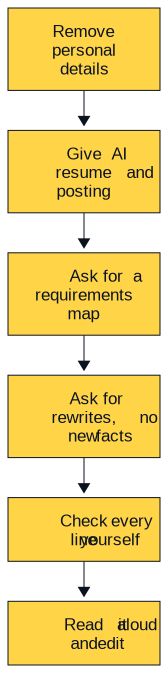
Step 1: Remove personal and confidential details
Before you paste anything, take out your name, phone number, email, street address and links to your profiles. Also remove anything your employer would consider confidential, such as client names, unreleased products or internal revenue figures.
University career centers agree on this. Harvard's guide says "Don't share personal or proprietary data when using generative AI." UW-Madison's career prompts go further, advising you to avoid entering employer names and individual names at all.
The bullets are what the AI needs. Your contact details add nothing to a rewrite.
Step 2: Give the AI your resume and the full posting
Paste your bullets, ideally from a master resume that holds everything you've done, and the whole job posting. Use one conversation per posting, so details from one job don't leak into another.
Include the posting's requirements and preferred qualifications, not just the title. The more specific your input, the less the AI has to guess.
Step 3: Ask for a requirements map, not a rewrite
Ask the AI to list each requirement, mark it required or preferred, and quote the line from your resume that proves it, or write "gap" if none does. This is the step most guides skip, and it's the most useful.
A map shows you what to work on before any wording changes. It also gives you a list of gaps to leave alone. If most requirements come back as gaps, the role may be a stretch, and no rewording will close that.
Step 4: Ask for rewrites with no new facts
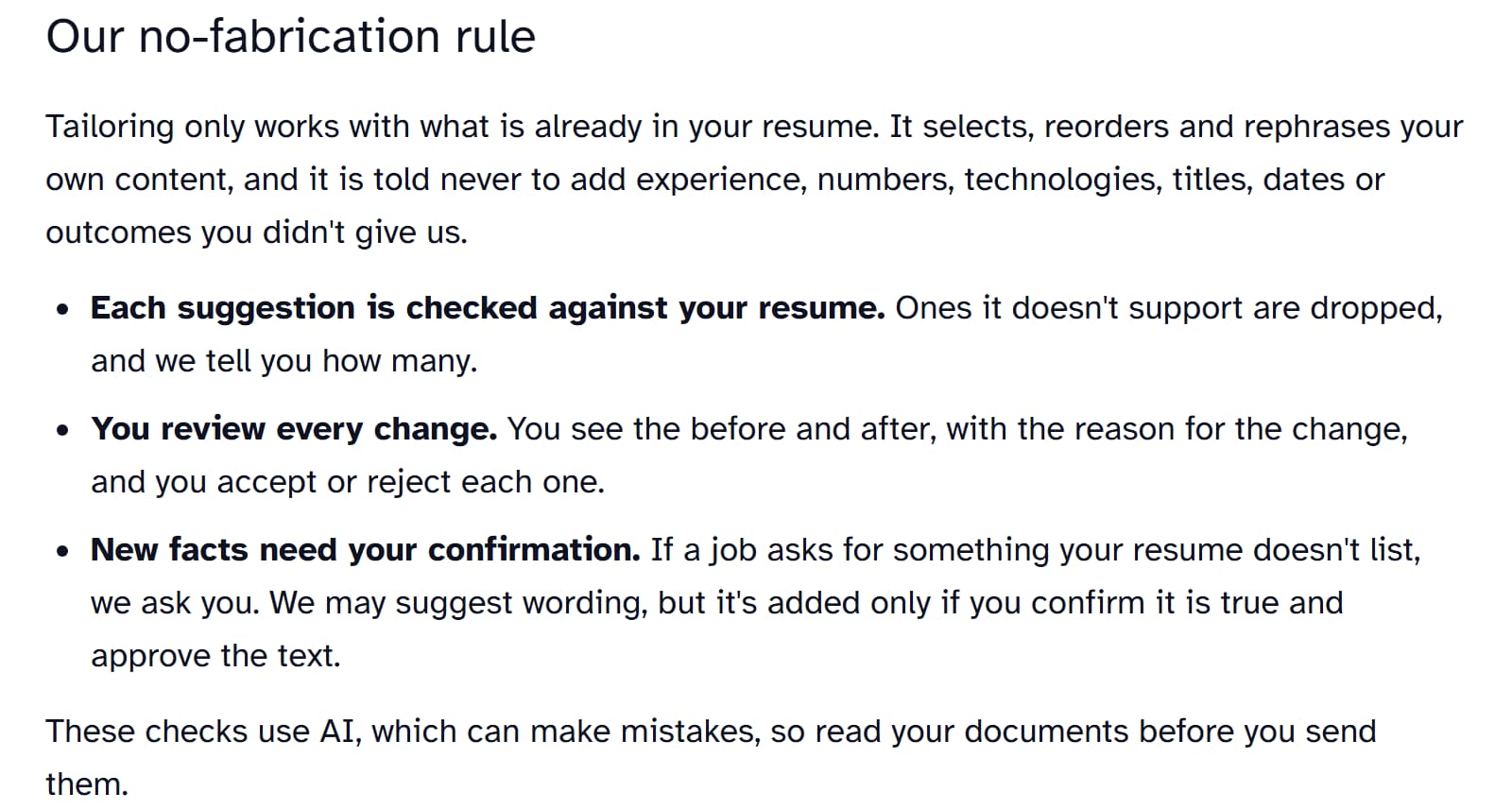
Now ask the AI to reword only the bullets that prove a requirement, using the employer's terms where they fit what you did. Tell it, every time, not to add numbers, tools, titles, dates, scope or results.
Ask for two or three options per bullet, so you can choose the one that sounds most like you. The prompts below include these rules.
Step 5: Check every line against your original
Put the AI's version next to your original and compare them line by line. Every number, tool, title, date and result in the new version must appear in the old one.
Watch for small upgrades too. "Helped with" becoming "led", "a team" becoming "cross-functional teams", or "monthly" becoming "weekly" all change the facts. Harvard's test is simple: be able to speak to every line of your resume if asked in an interview.
Step 6: Read it aloud and edit for your voice
Read the tailored resume out loud. Anything you'd never say, or that sounds like an ad, gets rewritten in plain words.
Then reorder: the bullets that prove the top requirements go first in each job, and your summary names the role and your strongest match.
What prompts should you use to tailor your resume with AI?
Use prompts that give the AI a narrow job and hard limits. Copy these and replace the parts in square brackets.
Prompt 1: Requirements map
Here is a job posting and my resume bullets. Personal details are removed.

List every requirement in the posting in a table with four columns:
requirement, required or preferred, the exact line from my resume that
proves it, and "gap" if no line does.

Quote my lines word for word. Do not reword anything yet.
Do not suggest skills I could add.

POSTING:
[paste the posting]

MY RESUME:
[paste your bullets]
Prompt 2: Rewrite without new facts
Rewrite only the bullets from the table that prove a requirement.

Rules:
- Use only facts in my original bullet. Do not add numbers, percentages,
  tools, titles, dates, team sizes, scope or results.
- Use the posting's term for something only if my bullet describes that
  same thing.
- Don't use these words: spearheaded, leveraged, results-driven, synergy,
  dynamic, passionate, cutting-edge.
- Vary the length and opening verb of each bullet.
- If a stronger bullet would need a number I didn't give, write [number]
  instead of guessing.

Give me two options for each bullet, and after each one, list exactly
what you changed.
Prompt 3: Summary
Write a two-sentence resume summary for this posting using only facts
that appear in my bullets above. Name the role I'm applying for. No
adjectives about my personality. Give me three versions.
Prompt 4: Final check
Compare my original bullets with the final version below. List every
number, tool, title, date, team size or result in the final version that
does not appear in the original.
The last prompt is a second pair of eyes, not a replacement for your own check. AI can miss its own additions.
What does an AI-tailored resume look like? A worked example
Here's one posting, the original bullets, what a careless prompt produced, and the checked version. The checked "after" uses only facts from the "before".
The posting
This job description is an illustration, written for this example. It isn't a real posting.
Marketing Coordinator, home goods brand, hybrid (Chicago)
Requirements: 1+ years of related experience. Plan and publish posts for the brand's social media channels. Write and send email newsletters in Mailchimp. Coordinate with designers on marketing materials. Report campaign results to the team.
Preferred: Google Analytics.
The five skill requirements are social media, email newsletters in Mailchimp, coordinating with designers, campaign reporting and Google Analytics.
The original bullets
The candidate has three years as an office coordinator at a dental practice in Chicago and is moving into marketing.
- Answered phones and scheduled appointments for 4 dentists.
- Wrote and posted updates on the practice's Facebook and Instagram pages 3 times a week.
- Wrote the monthly patient newsletter and sent it through Mailchimp.
- Worked with a freelance designer on new appointment cards and flyers.
What a careless prompt produced
The prompt was "Tailor my resume to this marketing coordinator job." The invented parts are in bold.
- Spearheaded a data-driven social media strategy that boosted engagement by 45% across platforms.
- Managed end-to-end email marketing campaigns in Mailchimp, reaching 5,000+ subscribers and tracking performance in Google Analytics.
- Led cross-functional collaboration with creative teams to deliver on-brand marketing assets.
- Reported campaign results to leadership, driving data-informed decisions.
It reads well and matches every requirement. Almost none of it is true. The 45%, the 5,000 subscribers, Google Analytics and campaign reporting don't appear anywhere in the original, and one freelance designer has become "creative teams". Each of those is a question the candidate can't answer in an interview.
The checked version
This came from the requirements map and the no-new-facts prompt, then a line-by-line check and a read-aloud edit.
- Wrote and published social media posts for the practice's Facebook and Instagram pages, 3 times a week.
- Wrote and sent a monthly email newsletter to patients using Mailchimp.
- Coordinated with a freelance designer on new flyers and appointment cards for the practice.
- Answered phones and scheduled appointments for 4 dentists.
What changed, and why
| Requirement | Original | Checked version |
|---|---|---|
| Social media | "Updates" on Facebook and Instagram, second bullet | "Social media posts", the employer's term, moved first |
| Email newsletters in Mailchimp | Clear already | Same facts, tighter wording |
| Coordinating with designers | "Worked with a designer", easy to miss | "Coordinated with", the employer's term |
| Campaign reporting | Not shown | Still not shown, because the candidate hasn't done it |
| Google Analytics | Not shown | Still not shown |
The 3 posts a week, the 4 dentists and the single freelance designer are unchanged. The phone bullet moved to the bottom because it proves none of the requirements, but it stays as proof of organized, people-facing work.
How the match changes
This score is an illustration, calculated by hand with the current weights on Rolefitly's How matching works page, linked above. It isn't from running the product.
Rolefitly's score is a weighted total of four parts. Skills count for 50%, location for 20%, experience for 15% and job title for 15%.
| Part | Weight | Original | Checked version |
|---|---|---|---|
| Skills (share of skill requirements proven) | 50% | 2 of 5 = 40 | 3 of 5 = 60 |
| Location (hybrid in Chicago, candidate lives there) | 20% | 100 | 100 |
| Experience (3 years against 1+) | 15% | 100 | 100 |
| Job title (office coordinator against marketing coordinator, not an equivalent) | 15% | 40 | 40 |
| Score out of 100 | 61 | 71 |
In this illustration, the social media and Mailchimp bullets count as proven in the original, and coordinating with designers only counts once the bullet says so plainly. The job title part doesn't change, because the title didn't change, and it shouldn't.
The careless version would have looked like a near-perfect match to any keyword checker. That's the trap: it matched by claiming things that aren't true. The checked version made the real fit visible, and a score only estimates fit. It doesn't predict an interview.
What should AI never change on your resume?
AI may change order, emphasis and wording. It should never change the facts. Keep this table next to you when you review its output.
| Part of your resume | AI can change | Keep exactly as it is |
|---|---|---|
| Summary | Which role it names, which proven strengths lead | Years of experience |
| Job entries | Order and choice of bullets | Job title, employer, location, dates |
| Bullets | Verbs, terms, length, which detail comes first | Every number, tool, team size and result |
| Skills | Order and grouping | No skill a bullet doesn't back up |
| Education | Order on the page, which courses or projects appear | Degree, school, dates, GPA |
| Certifications | Position on the page | Name, issuer, dates |
Some guides suggest changing your job title to match the posting. Don't. Your real title is a fact a past employer can confirm. Put the target role in your summary instead.
How do you make an AI-tailored resume sound like you?
Start from your own words and keep them where they're already good. AI should tighten your bullets, not replace them. UW-La Crosse's guide tells students to write their own draft first, so the result doesn't feel generic or impersonal.
Then edit the output with these checks:
- Read it aloud. If you'd never say a sentence to a person, rewrite it.
- Swap stock verbs for exact ones. "Wrote", "scheduled", "fixed" and "trained" say more than "spearheaded" or "leveraged".
- Keep one concrete detail per bullet, such as a tool, a count or who it was for.
- Vary the shape. Not every bullet needs a result clause at the end.
- Cut adjectives about yourself. "Detail-oriented" proves nothing. The bullet should show it.
- Use the employer's terms only for things you did. "Social media posts" is fine for Facebook updates. "Campaign strategy" isn't, unless you made one.
For more on wording bullets, see how to write resume bullet points. The free resume bullet point generator rewrites a bullet three ways and puts a [number] placeholder wherever a result would need a figure you didn't give.
Should you use a chatbot or a dedicated tailoring tool?
Either can work. What matters is whether the tool shows you each change and refuses to add facts.
| Question to ask | General chatbot | Dedicated tailoring tool |
|---|---|---|
| Does it show each change next to the original? | Only if you ask | Look for this before you trust it |
| Can it add facts you didn't give it? | Yes, unless your prompt forbids it, and sometimes even then | Depends on the tool, so check its stated rules |
| Do you control what it sees? | Yes, you choose what to paste | You upload a resume, so read its privacy policy |
| Does it know the posting's requirements? | Only what you paste | Some read postings directly |
| Can you accept or reject each change? | You do it by hand | Look for this |
Whatever you use, the check in step 5 is still your job. Cornell's business school career team puts it plainly: you will need to validate and personalize all output.
Is it OK to use AI to tailor your resume?
Yes, as long as the resume stays true and sounds like you. Using AI to reword your own experience is editing, like asking a friend to read it. Using it to add experience you don't have is the problem, whether a tool or a person writes it. The same goes for a cover letter tailored to the job.
Two cautions. Some employers set rules about AI in application materials, and Harvard advises following each organization's guidelines. And whatever AI writes, you're the one answering questions about it in the interview.
What are the most common mistakes when using AI on a resume?
Most come from letting the AI decide what's true, or from skipping the edit. Here are the ones to watch for, each with its fix.
- Asking AI to write the resume from scratch. It has nothing specific to work with, so you get generic text. Fix: give it your own bullets and ask it to edit them.
- Pasting your contact details and confidential work. You don't control where that text goes. Fix: remove names, contact details, client names and internal figures first.
- Accepting invented numbers. A made-up 45% falls apart the moment an interviewer asks about it. Fix: forbid new numbers in your prompt, and use [number] placeholders you fill with real figures or cut.
- Letting it upgrade your role. "Helped" becomes "led", one designer becomes "creative teams". Fix: compare verbs and scope line by line against your original.
- Changing your job title to match. Past employers can confirm the real one. Fix: keep the title, and name the target role in your summary.
- Keyword stuffing. A skills list copied from the posting with no proof convinces no reader. Fix: list a skill only if a bullet backs it up.
- Sending it without reading it aloud. Stock phrases slip through on screen. Fix: read it out loud and rewrite anything you'd never say.
- Reusing one chat for every job. Details from one posting bleed into the next. Fix: start a new conversation for each application.
Your AI tailoring checklist
Copy this list and run through it for each application.
- Removed my name, contact details and links
- Removed client names, internal figures and anything confidential
- Started a new conversation for this posting
- Pasted my real bullets and the full posting
- Asked for a requirements map before any rewrite
- Told the AI not to add numbers, tools, titles, dates, scope or results
- Left every gap as a gap
- Compared every AI line with my original
- Kept every title, employer, date, degree and number unchanged
- Removed stock phrases and read the whole resume aloud
- Moved the strongest proof to the top of each job
- Made sure I can explain every line with a real example
The searches this answers include "upgrade your resume for a custom fit", "ai tailor resume", "can ai tailor my resume to a job posting", and "resume tailor ai".