

To find keywords in a job description, read the whole posting, then mark the skills, tools, credentials and job-title terms it names, starting with the requirements section. Rank them by where they appear and how often. Then add the ones you really have to your resume, in the employer's exact words, inside bullets that prove them.
What are keywords in a job description?
Job description keywords are the specific, searchable terms an employer uses to describe the person they want. They're almost always nouns: skills, tools, licenses, degrees and job titles.
In plain terms, when you apply for a job, a keyword is a word or phrase a recruiter, or their applicant tracking system, might search for to find people like you.
"Microsoft Excel", "Zendesk", "accounts payable", "CDL Class A" and "project management" are keywords. "Fast-paced" and "team player" usually aren't, because no one searches for them.
The posting is your best source, because it's the employer's own list. VA Careers advises reading the entire announcement first, since useful words can sit anywhere in it.
Keywords aren't the same as requirements
A keyword is a word. A requirement is something the employer needs to see proof of.
"3+ years of Salesforce administration" contains the keyword Salesforce. Mentioning Salesforce doesn't meet the requirement. A bullet showing that you administered Salesforce for three years does.
Keep both in mind as you work. Find the keywords so a search can find you, and prove the requirements so the person reading is convinced.
Why do keywords matter on your resume?
Because software and people both look for them. Many applicant tracking systems let recruiters search and filter applications by term, and the recruiter who opens your resume is skimming for the same terms.
The East Texas A&M career guide puts it plainly: applicant tracking systems scan resumes for keywords found in the job description. A skill you have but name differently may not come up in a search. So may one hidden in a text box or a sidebar image, which is why an ATS-friendly resume format matters too.
Systems differ, and claims that a missing keyword means automatic rejection aren't backed by any source we could find. The safer reason is the simple one. If you did the work, say so in the words the employer uses.
How do you find keywords in a job description, step by step?
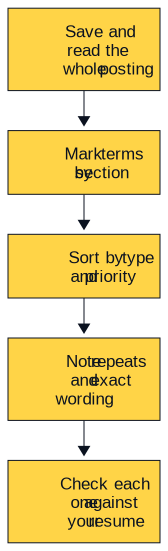
Work through five steps: save and read the posting, mark terms by section, sort them by type and priority, note exact wording and repeats, then check them against your resume. It takes one careful read and a short list.
Step 1: Save the posting and read it all the way through
Copy the posting into a document or save it as a PDF, since postings can come down before your interview. Then read it once without marking anything.
The first read tells you what the job really is. The marking comes next, and it goes faster when you already know which parts are boilerplate.
Step 2: Mark terms in the sections that carry weight
Go back through and highlight every skill, tool, credential and title term. Some sections carry more weight than others.
- Job title and first lines: the employer's own summary of the role.
- Requirements or minimum qualifications: the must-haves.
- Responsibilities or duties: what you'd do, which tells you which skills they'll test.
- Preferred qualifications: useful extras, not deal breakers.
- Company overview and benefits: context for a tailored cover letter, rarely resume keywords.
VA Careers points to the Duties, Requirements and Specialized Experience sections of federal announcements for the same reason. Those sections describe the work, so they hold the terms that matter.
Step 3: Sort each term by type and priority
Put each marked term in a type and a priority. This turns a long list of highlights into a short list you can act on.
| Type | Examples | Priority |
|---|---|---|
| Hard skills | Bookkeeping, data analysis, SEO | High when in requirements |
| Tools and software | HubSpot, Excel, Salesforce, Zendesk | High when named by brand |
| Credentials | RN license, CPA, CDL Class A, a degree | Highest if required |
| Job-title terms | Coordinator, analyst, associate | High, used in searches |
| Soft skills | Communication, leadership | Show in bullets, don't list |
A term marked "required", "must" or with a minimum number of years goes to the top. A term that only appears under "nice to have" goes lower.
Step 4: Note repeats and the exact wording
Count how often each term appears, and copy its exact spelling. A term named two or three times, especially in different sections, is one the employer cares about.
Wording matters because a search looks for words. The East Texas A&M guide gives the example of "Microsoft Excel" versus "Excel", and suggests using the employer's version.
Write acronyms both ways the first time, such as "Search Engine Optimization (SEO)". Grinnell College's career office and the University of Maryland's career center both recommend this, because a recruiter may search either form.
Step 5: Check each keyword against your resume
Go down your sorted list and find each term on your resume. Mark each one as shown, shown in other words, or not yours.
"Shown in other words" is where the work pays off. If you sent email newsletters and the posting says "email marketing", you can use their term for the same work.
"Not yours" stays off the page. That's the honest limit, and it protects you in the interview.
If you're applying to several similar jobs, repeat steps 2 to 4 on two or three postings. Terms that appear in all of them belong on your base resume.
A job description with its keywords marked: a worked example
Here's one posting, marked up in text, and one resume before and after adding its keywords. Each "after" bullet rephrases only facts already in the "before" bullet. Compare its tool requirements with those in open marketing coordinator jobs.
The posting
This job description is an illustration, written for this example. It isn't a real posting.
Marketing Coordinator, regional nonprofit, hybrid (US)
About the role: Support our small marketing team with email marketing, social media and event promotion.
Requirements: 1+ years of marketing or communications experience. Build and send email campaigns in HubSpot. Create social media graphics in Canva. Maintain the team's content calendar. Report monthly website results from Google Analytics.
Preferred: Search engine optimization (SEO). Salesforce.
The keyword list
Sorted with the steps above, the list is short.
| Keyword | Type | Where it appears | Priority |
|---|---|---|---|
| Email marketing | Hard skill | About, requirements | Required, repeated |
| Social media | Hard skill | About, requirements | Required, repeated |
| HubSpot | Tool | Requirements | Required |
| Canva | Tool | Requirements | Required |
| Content calendar | Hard skill | Requirements | Required |
| Google Analytics | Tool | Requirements | Required |
| Marketing coordinator | Job title | Title | High |
| SEO | Hard skill | Preferred | Preferred |
| Salesforce | Tool | Preferred | Preferred |
The resume before
The candidate is an office assistant at a community nonprofit who wants to move into marketing.
- Wrote and sent the monthly email newsletter to supporters using HubSpot.
- Made flyers and posts for our Facebook and Instagram pages in Canva.
- Kept a shared calendar of upcoming posts and events.
- Checked Google Analytics each month and told the director which pages got the most views.
The resume after
- Built and sent the monthly email marketing newsletter to supporters in HubSpot.
- Designed social media graphics and posts for Facebook and Instagram in Canva.
- Maintained the team's content calendar of upcoming posts and events.
- Reported monthly website results from Google Analytics to the director, highlighting the most-viewed pages.
What changed, and what didn't
This count is an illustration, worked out by hand for this example. It isn't output from running a product.
| Required keyword | Before | After |
|---|---|---|
| Email marketing | "Email newsletter" only | Named, same work |
| Social media | Only "Facebook and Instagram" | Named |
| HubSpot | Named | Named |
| Canva | Named | Named |
| Content calendar | "Shared calendar" | Named, same calendar |
| Google Analytics | Named, but as "checked" | Named, and "reported" now matches the duty |
Before, three of the six required terms appeared in the employer's words. After, all six do.
Notice what didn't change. SEO and Salesforce are still missing, because the candidate hasn't done either. The job title stays "Office Assistant", because that was the real title.
The candidate didn't become more qualified. Their real fit became easier to find and to read.
Where should you put keywords on your resume?
Put each keyword where it proves something: in a bullet first, then in your skills section and summary. The East Texas A&M guide lists the summary, skills section, experience bullets, projects and certifications as the places that count.
- Experience bullets: the strongest place, because the term sits next to what you did with it.
- Skills section: a quick list of tools and hard skills, each backed by a bullet or project. The guide to the resume skills section shows which skills belong there.
- Summary: two or three of the posting's top terms, for the reader's first glance.
- Certifications and education: credentials written exactly as the posting writes them.
- Projects: proof from class, volunteer or side work, which matters most early in a career.
For the full method of reordering and rewording your resume around a posting, see how to tailor your resume to a job description.
Can you use a tool to extract keywords from a job description?
Yes. Free keyword tools and chatbots can pull terms out of a posting in seconds, and they make a useful second pass after your own read.
- A keyword checker, sometimes called a job description keyword scanner, compares a posting with your resume and lists what's missing. Rolefitly's ATS keyword checker treats common spellings as the same thing, so "Postgres" matches "PostgreSQL".
- A chatbot can sort a posting's terms into required and preferred. The University of Maryland's career center suggests a prompt asking for the top keywords from a pasted job description. To have it reword your bullets as well, see how to use AI to tailor your resume without adding facts.
- A word cloud shows which words repeat, but it counts words like "team" and "work" as often as skills.
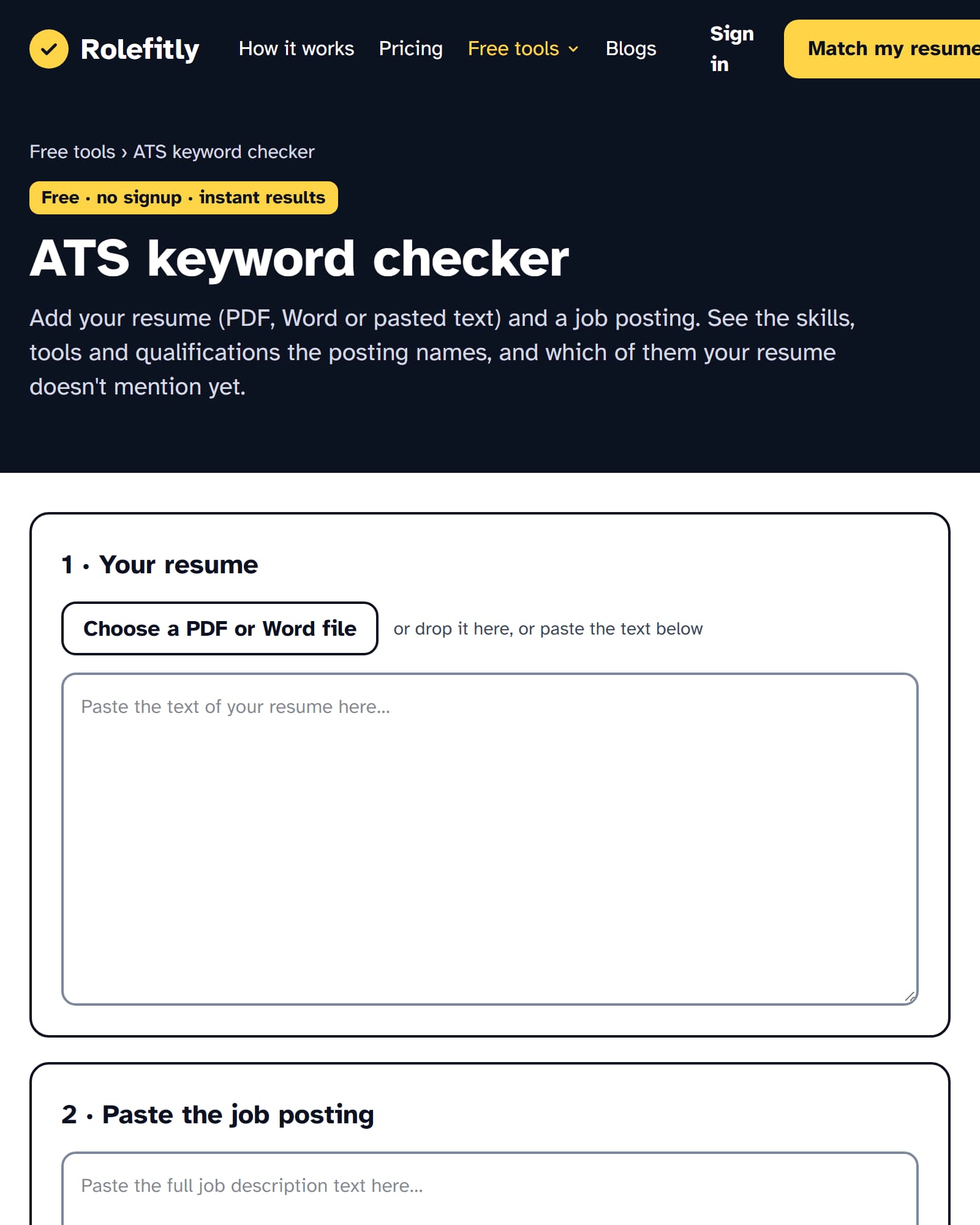
Every tool has the same limit: it finds words, not proof. Check its list against the posting, and decide yourself which terms are true for you.
Keywords are also only part of a match. To see whether each full requirement is met, such as years of experience with a tool, the resume vs job description checker goes requirement by requirement.
What are the most common keyword mistakes?
Most mistakes come from treating keywords as a word count instead of evidence. Here are the common ones, each with its fix.
- Pasting sentences from the posting. It describes the job, not you, and VA Careers calls it a red flag. Fix: use the employer's term inside your own bullet about your own work.
- Stuffing a term over and over. Repeating "project management" ten times proves nothing more than saying it once with proof. Fix: name it once or twice, where it shows what you did.
- Hiding keywords in white text. It shows up when the file is converted to plain text. Fix: put true keywords where people can see them.
- Adding a skill you don't have. It comes apart in the interview. Fix: leave it off, and address the gap in your cover letter if it matters.
- Using only the acronym, or only the full term. A search for one may miss the other. Fix: write both the first time, such as "Certified Public Accountant (CPA)".
- Listing keywords with no proof. A long skills list with nothing behind it reads as padding. Fix: make sure every listed skill appears in a bullet or project.
- Treating the company overview as keywords. "Mission-driven" and "innovative" aren't skills. Fix: save that language for your cover letter.
- Changing your job title to match. Past employers can confirm your real title. Fix: keep the title, and let your bullets show the overlap.
Your keyword worksheet
Copy this table into a document for each posting. Fill one row per keyword, then work from the top.
| Keyword (exact spelling) | Type | Required or preferred | Times named | On my resume? | Proof line, or "not mine" |
|---|---|---|---|---|---|
| Yes, in other words, or no | |||||
And a short checklist before you send the resume:
- Read the whole posting once before marking anything
- Marked skills, tools, credentials and title terms
- Sorted them into required and preferred
- Copied the employer's exact spelling, with acronyms written both ways
- Found a proof line for each keyword I really have
- Used the employer's term only for work I really did
- Left off every keyword I can't back up
- Put the top terms in my summary and first bullets
- Checked that every skill in my skills list appears in a bullet or project
The searches this answers include "keyword skills and abilities", "adding keywords to resume", and "keywords in job postings".